
Why Do We Still Need to Optimize Spec Documents Beforehand, Even with OpenSpec and Superpowers?
Let’s say you come across a requirement like this — one that you’ve probably seen in plenty of projects:
During the promotional event, issue discount coupons to users. Users can apply them at checkout.
Looks fine at first glance, right? A human reader can “read between the lines” and get the general idea. But the moment you feed it directly into an OpenSpec workflow, things start going off the rails:
- Coupons went to everyone, including blacklisted users;
- No per-user limit was set, so one user racked up thousands of coupons;
- No expiration dates or stacking rules, meaning coupons could stack infinitely and checkout amounts went negative.
This isn’t AI’s fault. The raw material I gave it was way too rough.
⚠️ My core takeaway:
This doesn’t mean you’re forced to write every single detail upfront in a “low-precision spec document.” Rather, it means leveraging AI’s massive training data to shift from “AI decides and implements” to “AI evaluates, offers options, and lets you decide.”
Before handing this “low-precision spec document” to any AI framework — OpenSpec, Superpowers, GSD, whatever — spending thirty minutes on a thorough optimization pass is far more cost-effective than spending half a day debugging afterward.
Here are four reasons I’ve learned the hard way.
1. Natural Language Is Inherently Ambiguous
The reason human-to-human communication is so efficient is precisely because language isn’t perfectly precise — we share a ton of background knowledge. When you say “close the door,” the other person already knows which door, when, and how far. We don’t need to spell all of that out.
But AI doesn’t have those default assumptions. AI can’t “read the room” and infer your real intent the way humans do. It picks the most probable interpretation based on patterns — and that “most probable” interpretation isn’t always the one you actually want.
For a deeper dive into why this gap exists, see my earlier article on Intent Alignment in the AI Coding Era.
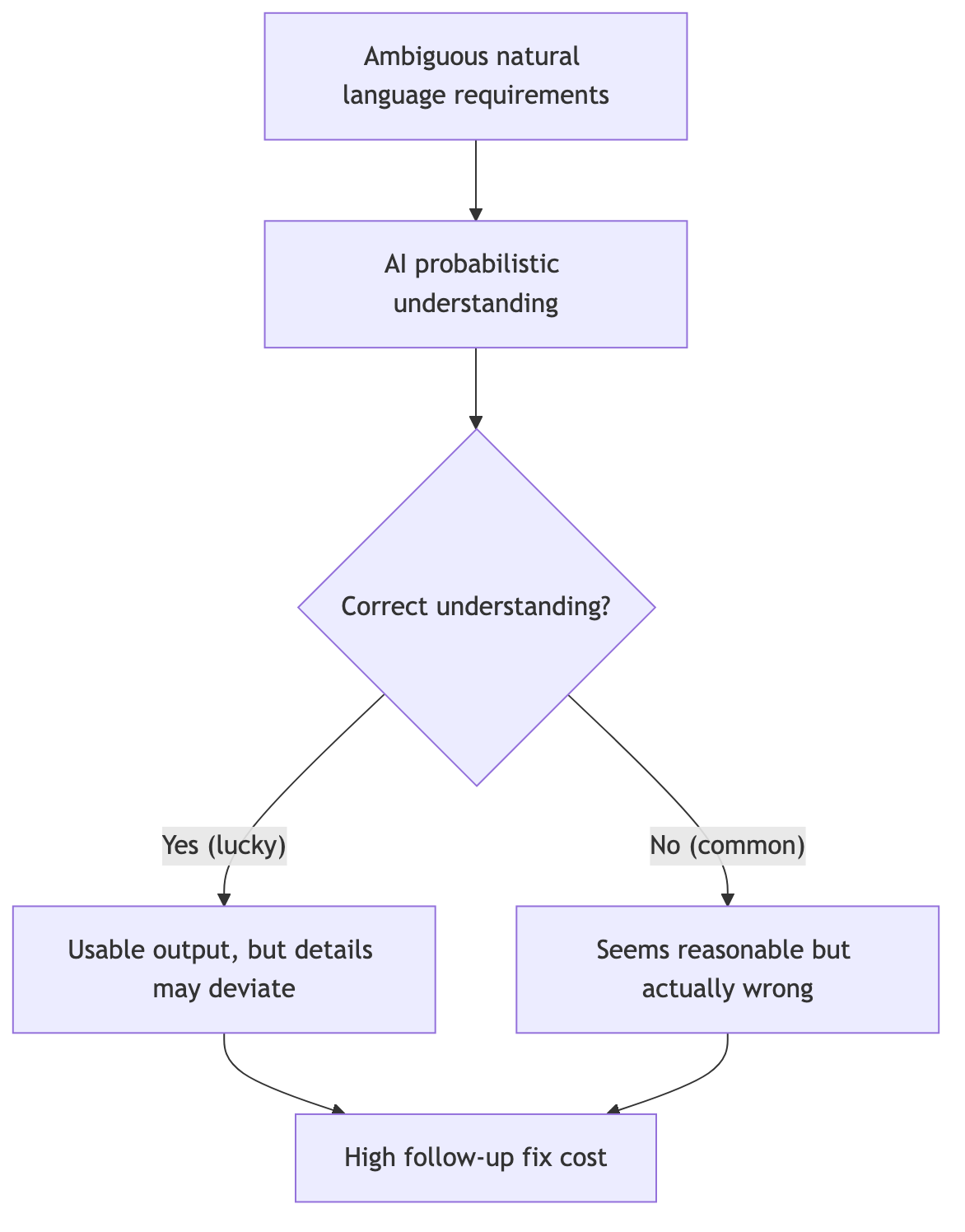
Consider these real examples:
- “Support bulk import” — How many items at once? 10? 100,000?
- “Data updates in real time” — Milliseconds? Seconds? Or a refresh every minute?
- “Improve performance” — What’s the current baseline? What counts as “improved”?
In human conversations, these gaps get filled through follow-up questions. But if a spec document carries these gaps directly into an AI-driven development pipeline, the AI will fill them with “reasonable assumptions” — and those assumptions are very likely not what you had in mind.
2. The Clarification Mechanisms in OpenSpec and Superpowers Aren’t Robust Enough
I’ll give credit where it’s due: the core idea behind spec-driven frameworks like OpenSpec and Superpowers is solid. When in doubt, ask — don’t make things up. The clarification mechanism does help catch some missed requirements.
But in practice, I’ve found that the depth of clarification they provide is simply not enough.
My experience
OpenSpec and Superpowers have a basic awareness of asking follow-up questions, but both the depth and breadth fall short. Someone needs to sort out the requirements first — only then can these tools ask genuinely valuable questions. Otherwise, they don’t even realize they don’t know what to ask.
Three specific issues:
First: too few questions. A moderately complex engineering task (say, “build an order system with permission management”) realistically needs somewhere between 20 and 100 follow-up questions to nail down the details. OpenSpec typically asks three to five, decides it “understands,” and moves on. It won’t chase down things like: does an order above a certain amount require special approval? What happens to in-progress orders when a user’s permissions are revoked?
Second: AI’s understanding carries randomness. Feed the same ambiguous requirement and the same prompt at different times, and you might get different interpretations. Sometimes it asks me a question the first time and then just makes its own decision the second time without asking at all.
Third: the granularity of questions is too coarse. Things like field validation rules, exception branch handling, API timeout strategies — it doesn’t ask about any of these. Because these details are too granular to be flagged by an analysis of a vague original document.
3. Fine-Grained Control Must Be Frontloaded
Sometimes you have very specific requirements about how a project should be implemented. Not just “get it roughly working,” but “this must be done this way, and that must absolutely not be handled that way.”
Control comes from certainty
When you nail down the details at the document stage, AI’s execution path narrows. The narrower the path, the less likely it deviates from your goal.
Take a payment module as an example. If you just tell AI to “support multiple mainstream payment methods,” it’ll make its own calls on:
- Synchronous or asynchronous callbacks
- Timeout duration
- Number of retries on failure
- What happens when retries are exhausted
- Whether to implement replay attack prevention
None of these decisions are wrong in themselves, but you probably already have a specific requirement for each one. If the spec document doesn’t clarify them upfront, correcting them one by one after AI generates the proposal effectively doubles your workload.
My approach: before entering the OpenSpec or Superpowers workflow, run the spec document through a systematic set of rules to polish every ambiguity down to precision — echoing my core point from the beginning: “you don’t need to write every detail upfront in a low-precision spec. Instead, leverage AI’s training data to shift from AI making decisions for you, to AI providing options that you then choose from.” The benefits:
- Reduced AI decision space: the more precise the details, the fewer opportunities for the AI to invent its own assumptions
- Lower rework risk: alignment happens at the document stage, so the code output stays on track
- Higher review efficiency: the specification-driven proposal documents that come out are higher quality to begin with, making review cheaper
4. This Entire Method Can Become Your Own Skill
Final point, and one I think is highly valuable: the entire set of optimization rules and the implementation flow I’m about to describe can be packaged into your own custom Skill.
What does that mean? Instead of manually checking documents against these rules every single time, you can encode ambiguity word detection, logical completeness checklists, priority labeling conventions, quantity-and-time precision reference tables — all of it — into a Skill or a prompt template. Then, for any new requirement, just throw the raw spec (your low-precision document) in, and AI will automatically run your defined optimization rules against it.
It’s like installing a “requirement quality gate” into your AI toolchain. It doesn’t replace human judgment — it automates the repetitive, easily-forgotten detail-checking steps.
My suggestion
If you already have a set of coding standard Skills (code style, directory structure, comment conventions, etc.), consider adding a “Spec Optimization Skill” alongside them. It kicks in before you even reach the actual coding workflow, pulling your input quality up to a much higher level. When input quality is high, everything downstream flows more smoothly.
How Do I Actually Optimize a Low-Precision Spec Document?
1. Core Optimization Rules
a. Ambiguity Word Detection and Replacement
This is the first checkpoint. Natural language is packed with semantically vague words, and if used without scrutiny, they create multiple interpretation paths for AI or human readers alike.
Ambiguity of “and”: A document says “the system needs to support A and B.” Does “and” mean both are mandatory (conjunction), or is it just an example list? If both are required, rewrite to “the system must support both Feature A and Feature B.” If it’s an example, use “the system needs to support features such as A, B, etc.”
Ambiguity of “or”: A document says “users can log in via WeChat or Alipay.” Does “or” mean exactly one of the two (exclusive), or that at least one is supported? If the intent is that users pick exactly one, rewrite to “users must choose exactly one login method: WeChat or Alipay.” If both are available but neither is mandatory, use “users may log in via WeChat, via Alipay, or via either — at least one must be supported.”
“If” without “else”: A document says “if a user enters the wrong password 3 times in a row, lock the account” — but doesn’t say what happens if they don’t, or how to unlock. The fix must complete the conditional branch: “if a user enters the wrong password 3 times consecutively, lock the account for 30 minutes; otherwise, allow normal login; the lock expires automatically after 30 minutes, and the user may retry.”
Vague modal verbs: “Should” and “try to” are the most easily overlooked weak constraints. “The system should log events” vs “the system must log events” — the former leaves an opening to skip logging without technically violating anything, while the latter is a hard requirement. Standardize during review: use “must” for mandatory scenarios, “prefer” for recommendations, and eliminate “should/try to” entirely.
Fuzzy quantities and times: “Some data,” “many users,” “as soon as possible,” “fast response” — these expressions have zero operational meaning at execution time. They must be converted to specific numbers, ranges, or time metrics.
b. Logical Completeness Check
A complete instruction must cover all possible execution paths, not just the happy path.
Success and failure dual coverage: A document says “after the user submits the order, save the data.” That only describes the success path. The complete version: “after the user submits the order, the system saves the data to the database; on success, return the order number and a success confirmation; on failure, return the specific error reason, prompt the user to retry later, and log the error for troubleshooting.”
Normal flow and exception handling: A document says “parse the content after uploading the file.” But what if the file exceeds the size limit? What if the format isn’t supported? What if the upload gets interrupted? The complete description must include: file type validation, size limits, timeout handling, network interruption retry mechanisms, and user feedback on parse failure.
What can and cannot be done: A document says “administrators can perform operations” — but doesn’t specify which admins, which operations, or which scenarios are forbidden. Permission boundaries must be explicit: which roles are excluded? Which actions are prohibited? Example: “super administrators can delete any article; regular administrators can only delete articles they published; no administrator can delete archived articles.”
Default behavior definition: What should the system do when none of the defined conditions apply? The spec must define this explicitly: “if a user’s role does not match any of the above, default to view-only permissions — editing and deletion are not available.”
c. Priority and Ordering
When multiple tasks or rules coexist, failing to define execution order and priority causes chaos.
Numbered steps: A document says “do A first, then B, and also do C while you’re at it.” The “while you’re at it” completely destroys priority. Fix: “Step 1: execute operation A → Step 2: execute operation B → Step 3: execute operation C.”
Priority labels: Use [Must], [Important], [Optional] tags to force a clear distinction in constraint strength. Example:
- [Must] User passwords must be at least 8 characters long
- [Important] Passwords should include uppercase, lowercase, and numeric characters
- [Optional] Periodic password rotation is recommended (every 90 days)
Concrete criteria for subjective terms: A document says “handle important things first” — but “important” is subjective. Give it objective criteria: “when an order amount exceeds $10,000 or the customer tier is VIP, treat it as high priority and process within 2 hours; all other orders are processed in submission-time order.”
d. Precise Quantities and Timeframes
Vague quantity and time expressions are the primary cause of requirement distortion.
Quantity precision reference:
- “Some data” → “no more than 100 records”
- “Many users” → “when concurrent online users exceed 1,000”
- “A large amount” → “a single transaction exceeding $100,000”
- “Rare cases” → “scenarios with an incidence rate below 5%”
Time precision reference:
- “As soon as possible” → “within 24 hours”
- “Fast response” → “first-screen load time under 3 seconds”
- “Frequently” → “at least 3 times per week”
- “After a while” → “after a 500ms delay”
- “Real time” → “data refresh interval not exceeding 30 seconds”
e. Roles and Permissions
Vague permission descriptions are the root cause of security incidents.
Role type specification: A document says “users can view” — this must be refined: “regular users can only view orders they created; paid users can view all public orders; super administrators can view all orders, including deleted ones.”
Operation permission specification: A document says “authorized users can edit articles” — spell out the concrete list:
- Allowed: modify article title, modify body content, add or remove images, change categories and tags
- Not allowed: delete articles (admin only), publish articles (requires reviewer approval), modify author information (author only)
Permission trigger conditions: Define when permissions are granted and when they are revoked. “Users automatically gain edit permissions after completing identity verification; all edit permissions are immediately frozen while the account is suspended.”
2. Implementation Guidelines
- Don’t guess requirements: when ambiguity exists, ask clarifying questions first. Don’t assume implied requirements or add unrequested features based on “common practice.”
- Keep it simple: if 50 lines solve it, don’t write 200. No over-abstraction, no unnecessary abstraction layers, interfaces, or factory patterns. Prefer off-the-shelf solutions.
- Make only local changes: strictly limit the scope of modifications. Don’t refactor other files as a side effect, don’t standardize naming conventions across the project. Minimize the change footprint.
- Define “done” first: for bugs, reproduce first. For features, define acceptance criteria and test methods upfront. Must run validation upon completion with verifiable evidence.
- Step-by-step implementation, control context: break large tasks into small steps. Keep context usage below 60%. Suggest starting a new session proactively if context gets too long, to avoid AI memory confusion and hallucination.
- Comments and commits: code must include comments.
- Phased Git commits: commit immediately after each logical unit is complete. Format:
prefix: description. Prefix conventions:featfor new features,fixfor bug fixes,refactorfor refactoring,docsfor documentation,stylefor formatting,testfor tests,chorefor build configuration. - Golang project structure: new projects follow standard layout (
cmd/,internal/,pkg/,api/,configs/,scripts/,docs/). Existing projects maintain their current structural consistency — don’t force normalization. - Defensive programming (mandatory for software tasks):
- Input validation: all external input entry points must validate
- Nil handling: all potentially nil values must be checked
- Error handling: every operation that can fail must have a clear error handling path
- Boundary conditions: array indices, string lengths, numeric ranges must be protected
- Defaults: configuration items and optional parameters must provide reasonable defaults
- Fail-safe: partial component failures should degrade gracefully, not crash entirely
- Logging: critical operations and exception paths must be logged
3. Implementation Workflow
Step 1: Gather Background Knowledge
- Confirm whether there are background materials available for investigation (project code, documentation, knowledge bases).
- If background knowledge exists, read the relevant files to understand the project/business context, then ask precise questions based on actual details.
Step 2: Decide Whether to Include TDD (for Software Development Tasks)
- When the task involves programming, code implementation, or API development, ask whether test-driven development should be included.
- If yes, supplement questions about test types, coverage scope, and boundary conditions.
Step 3: Choose Questioning Mode
- Minimal mode: 1 round, 1–5 questions per round. Suitable for straightforward cases or tight timelines.
- Standard mode (recommended): 1–3 rounds, 3–5 questions per round. Balances efficiency and depth.
- Professional mode: 3–5 rounds, 5–10 questions per round. Deep and comprehensive coverage of details.
Step 4: Analyze the Original Document and Clarify Through Multi-Round Questions
- Identify ambiguous vocabulary, fuzzy expressions, missing conditions, and implicit assumptions.
- Keep questions concise and precise, with clear options. Mark recommended items and allow custom answers.
- End a round early once sufficient clarity is achieved.
Step 5: Output the Optimized Document
- Create
[original-filename]_optimized.mdin the same directory as the original file. - Automatically reformat with structured layout — no extra information added (no scores, summaries, version numbers, etc.).
- Pure document output, ready for immediate use.
Final Thoughts
This is the first time I’ve systematically practiced upfront spec document optimization, and the results exceeded my expectations.
Let me recap the core points from this article:
First, don’t count on OpenSpec or Superpowers to make up for your spec document’s quality. Their questioning mechanisms are the icing on the cake, not the cake itself. Asking questions on top of an ambiguous original document will only yield ambiguous answers.
Second, ambiguity is not a small thing. Every vague word in natural language is, in AI’s eyes, a space for creative license. Words like “automatic,” “support,” and “fast” are harmless in human conversation, but in a spec document, they’re landmines.
Third, optimization is not rewriting. You don’t need to expand a three-to-four-line document into a three-to-four-thousand-word essay. The key is eliminating ambiguity, completing branches, and pinning down boundaries and quantities. Often, it’s just adding a “must” in the right place or swapping a vague word for a concrete number, and the document’s quality jumps a level.
Fourth, tool it. Write the entire set of rules into a Skill and let it run automatically. Configure once, reuse endlessly — that’s engineering thinking.
Fifth, build a self-evolving LLM-Wiki. These optimization rules aren’t a one-time consumable. Every pitfall you step into, every new ambiguity pattern you discover, every checklist you refine — all of it should be sedimented into your personal knowledge base. I wrote at length about this methodology in my piece on building a personal LLM Wiki with Karpathy’s approach and Obsidian: extracting fragmented experience from AI sessions into structured knowledge, then interconnecting it with wikilinks to form a knowledge graph. Spec optimization rules are just one node in that graph. With continuous use, it grows thicker and richer, eventually becoming your own engineering asset library.
If you haven’t tried this yet, I suggest starting today. Take a requirements document you wrote recently and run it through the rules from section two. You’ll be surprised to find that the places you thought were “already clear enough” are actually full of hidden traps.