The Spark: Karpathy’s Gist
Last week, I read through a gist that Karpathy published. You can find the original here.
He laid out an idea that immediately clicked for me: instead of letting knowledge be a one-off retrieval product, place an LLM-maintained Wiki layer between raw documents and the user. Every time a new document comes in, the LLM writes summaries, updates existing pages, spots contradictions between old and new claims, and maintains the links between pages. Knowledge accumulates. It grows.
I thought his comparison between RAG and Wiki was particularly clear:
With RAG, every query goes back to the raw documents, grabs fragments, stitches together an answer, and then walks away. Nothing persists. New documents just get indexed—the system doesn’t care about what was searched before.
With a Wiki approach, knowledge has continuity. New content flows in and actively reshapes existing pages. The knowledge base grows itself.
Karpathy calls this a three-layer architecture: the Source (read-only), the Wiki layer (read-write for the LLM), and the Schema (instructions telling the LLM how to manage the Wiki). He also introduces the concept of Lint—periodic health checks where the LLM scans for contradictions, outdated pages, and orphaned nodes that aren’t linked to anything. And he makes a sharp observation: LLMs don’t mind the maintenance overhead. They can update a dozen files at once without forgetting to fix a single link.
After reading it, one question kept coming back: could I actually use this in my own development workflow?
I’ve been using Obsidian for daily note-taking for a while. But Obsidian has a well-known pain point: you have to manually organize everything, manually create every link. Karpathy’s approach hands that grunt work to the LLM. The natural next step was obvious—combine the two. Obsidian handles presentation and browsing; the LLM handles generation and maintenance.
Directory Structure
Before writing any code, I settled on a directory layout.
|
|
Each directory has a clear responsibility:
0_Source_Documents is the read-only layer. Project docs, technical articles, reference materials—whatever you drop in, the LLM reads but never modifies.
1_Session_Fragments is the raw archive. After every conversation with the LLM, any technical discussion, debugging experience, or architectural decision worth keeping gets extracted and saved. Subdirectories by date prevent any single folder from becoming unwieldy. The naming convention is session_id + session topic, making it easy to trace back to a specific session later.
2_Knowledge_Graph is the core layer. While fragments are raw, the knowledge graph is distilled. Each page has a number, a summary, detailed content, and Wikilinks to other pages. The graph is organized into four category subdirectories:
- 01_Knowledge_Management — Wiki architecture, system configuration
- 02_Workflows — Plan reviews, execution frameworks
- 03_Architecture_Dev — Microservices, development standards, toolchains
- 04_Ops_Environment — Deployment, environment configuration
Wikilinks must use the full path, like [[2_Knowledge_Graph/03_Architecture_Dev/0022_dependency-injection-standards]].
index.md is the entry point. No vector search needed—just a Markdown table listing all knowledge pages by category, with a one-line summary and tags for each. To find something, scan the index first, then click through to the specific page. It works remarkably well at medium scale (dozens to hundreds of pages).
log.md is the append-only operation log. Every workflow run gets a record: which pages were affected, what was added, what was discovered.
AGENTS.md is the rulebook. It tells the LLM how My-Wiki operates, what file formats to follow, what the incremental update strategy looks like. This file isn’t set-and-forget—in practice, whenever I find a rule gap, I update it and log the change.
Three Workflows
With the directory structure in place, I wrote three Skills to cover the complete workflow:
my-wiki-src (Source Ingestion): Reads materials dropped into 0_Source_Documents/ and distills knowledge into 2_Knowledge_Graph/. A single document can affect a dozen existing pages—updates, additions, new wikilinks.
my-wiki-talk (Session Extraction): This is the one I use most. It reads historical sessions via the session API, extracts valuable conversations into knowledge fragments, and integrates them into the knowledge base. The full pipeline: read session → generate fragment files → distill knowledge pages → establish bidirectional Wikilinks → update index → append log.
my-wiki-think (Self-Inspection): Runs periodically. Scans all knowledge pages, hunting for contradictory claims, orphaned pages, missing links, and content that doesn’t conform to AGENTS.md standards. It also surfaces concepts that get mentioned repeatedly but haven’t been promoted to their own pages.
These three workflows map directly to Karpathy’s three core operations: Ingest, Query (replaced here by “talk”), and Lint.
The First Run
After writing the Skills, I triggered /my-wiki-talk for the first time. It swept through all my historical sessions from January to April.
15 sessions read. 15 fragment files generated. 8 initial knowledge pages distilled.
Those 8 pages covered the core topics at the time: the LLM-Wiki architecture itself, system config standards, enterprise-grade knowledge base practices, plan review workflows, E2E testing concepts, thinking language configuration, and ops tool selection.
Over subsequent runs, I kept extracting from sessions on different topics. Migration strategies across different projects, service relocation pitfalls, CI/CD build fixes, type-matching rules for dependency injection, layered architecture design for microservices—all of it settled methodically into the knowledge graph.
After each run, I review the output. Are the YAML headers on fragment files correct? Are the knowledge page summaries accurate? Do any Wikilinks point to non-existent pages? These are things I verify. It’s not fully hands-off—a human still needs to take a look.
The knowledge pages grew from 8 to 43.
Lessons from Practice
Going through this end-to-end, I distilled a few takeaways. Nothing groundbreaking—just things I genuinely believe now that I’ve walked the path myself.
Knowledge Accumulates, It Doesn’t Get Collected
This is the most fundamental shift. My old habit was: hit a problem, search for docs, solve it, forget it. Next time the same problem shows up, start searching from scratch.
Now it’s different. Once a debugging experience proves reusable, it gets distilled into a knowledge page. And repetition isn’t a bug—it’s a feature. The same concept might appear across sessions from different projects, each time bringing a new angle, new context. Session fragments preserve the raw record; the knowledge graph distills the common thread.
Take one technical concept that showed up in several project sessions. The first session documented basic configuration rules. The second captured a pitfall in an edge-case scenario. The third fixed a type-mismatch error. Three separate fragments, each archived independently. In the knowledge graph, they merge into a single comprehensive usage spec with source attribution. Next time a similar problem comes up, I don’t dig through hundreds of session records—I go straight to the page.
Layered Isolation Minimizes Cascading Changes
0_Source_Documents stays untouched. 1_Session_Fragments archives by date, never modified. 2_Knowledge_Graph is freely editable. This layering proved incredibly useful in practice.
- Source documents are read-only. Whatever you drop in, the LLM reads but never alters. This guarantees the integrity of original materials and keeps the LLM out of the gray zone between “helping you” and “rewriting your stuff.” It reads, it doesn’t optimize.
- Session fragments are the archive layer. Subdirectories by date, each file named with a session_id plus topic. The session_id guarantees uniqueness—no naming conflicts. Date-level directories prevent any folder from accumulating hundreds of files, so Obsidian stays snappy. These fragments are like git commit logs: raw records, not to be lightly altered.
- The knowledge graph is the read-write layer. Here the LLM can insert, delete, modify. To batch-update a concept’s description, you just edit the knowledge graph pages—no need to dig through fragment files. The index and knowledge graph numbering are one-to-one; if a file gets renamed, only
index.mdneeds syncing. - The rules file (AGENTS.md) is maintained independently. In practice, when a workflow step was missing or a format convention was unclear, I edited AGENTS.md directly. Change the rules, and the next workflow run follows the new ones. I log every change in log.md, so I can trace what changed and why.
Self-Inspection Is Mandatory, Not Optional
At first, I assumed a knowledge graph, once built, would just run itself. That turned out to be wrong.
As knowledge pages grow and multiply, the link relationships get complex. Some pages appear only in the index but are never referenced by another knowledge page—those are orphans. Some concepts get mentioned repeatedly across pages but never get their own dedicated page. Some Wikilinks break because the target file got renamed.
So after every batch of new knowledge, I run /my-wiki-think. It scans all pages and reports what’s wrong. I then decide how to handle each issue—merge duplicate content, create missing pages, fix broken links.
It’s like code review. You write code thinking it’s fine, then run a linter and suddenly discover misspelled variables, unused imports, and two functions whose logic overlaps. The knowledge graph is no different. Without inspection, problems compound.
The Human Is an Architect, Not an Editor
What the LLM can do: read, generate, link, fix, number, update the index.
What the LLM cannot do: decide which knowledge is worth preserving, which duplicates should merge, which new concepts deserve their own page, or which claim to trust when two conflict.
It executes. I decide.
This aligns perfectly with Karpathy’s division of labor. The human’s role in this system isn’t diminished—it shifts from “the person who writes docs” to “the person who manages docs”—curating sources, steering analysis, asking good questions, thinking about what these knowledge pieces actually mean. All the mechanical work gets offloaded to the LLM.
Where Obsidian Fits In
I’ve always used Obsidian locally for note-taking. After My-Wiki was up, Obsidian’s role became the browsing and editing interface.
The knowledge graph pages are plain Markdown files—Obsidian opens them natively. Wikilinks use the [[page title]] format, which Obsidian recognizes and navigates without issue. Open Obsidian’s graph view, and you can see the link relationships between all knowledge pages at a glance—which pages are central hubs, which are peripheral.
Obsidian handles presentation, search, and manual editing. The LLM handles generation and maintenance. They’re not substitutes for each other. They’re complementary.
Data Synchronization
Since the entire knowledge graph is plain Markdown, it’s naturally suited for version control and sync. I use ZeroTier for networking and Syncthing to sync the entire my-wiki directory across devices in real time. Whether I’m at the office on my work machine, at home on my Mac, or traveling with my laptop, I always have access to the latest knowledge pages. No data hostage to a single machine.
Where Things Stand Now
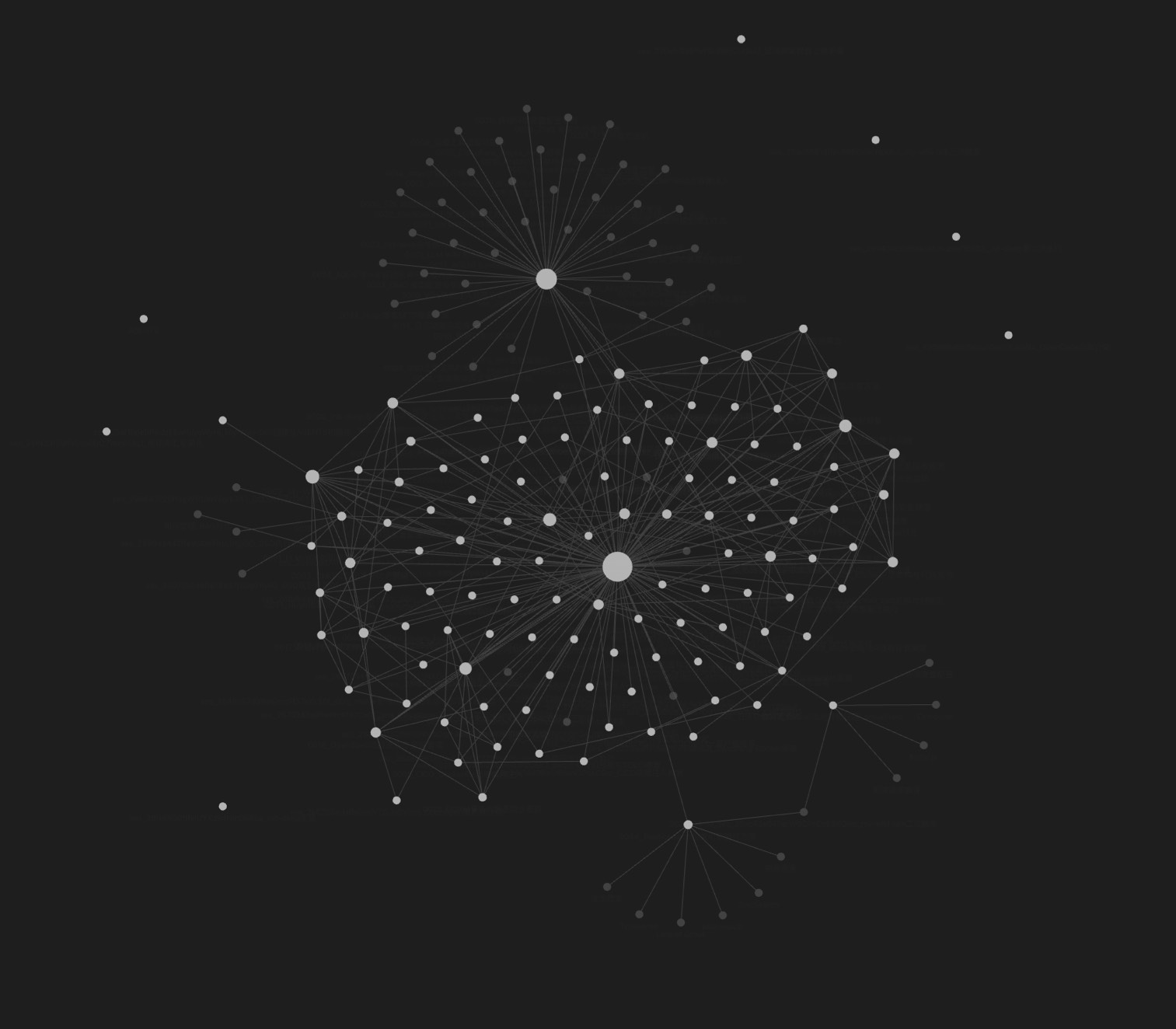
The knowledge graph is grouped and numbered by module—knowledge base & systems, plans & workflows, microservices & architecture, development & toolchains, ops & environment. Each page has a summary, tags, and source traceability.
Opening the my-wiki directory in Obsidian reveals the full relationship graph: which page references which, which concepts get used across which projects, which session fragment each piece was distilled from. The graph view makes the entire structure of interconnected knowledge immediately visible—central nodes and peripheral ones, dense clusters and isolated topics, all laid out in a single visual map.
The knowledge base is now at 43 pages and growing. Each new session adds fresh material, each lint pass keeps things clean, and the whole system runs on a rhythm that feels natural rather than forced.