Vibe Coding 时代的 Git Worktree 实践指南
前言:AI 时代的开发范式转变
当我们谈论"Vibe Coding"时,我们指的不是某种新的编程语言或框架,而是一种全新的开发范式——AI 驱动的交互式编程。在这个时代,代码不再是开发者独自敲击键盘的产物,而是人与 AI 持续对话、协作探索的结果。这代表了软件开发方式的一次重大 Vibe Coding: Harness Engineering 范式转变。
然而,这种范式转变却暴露了传统 Git 工作流的深层瓶颈:
⚠️ Warning: 单一 working directory 的限制
传统 Git 假设一个仓库只有一个工作目录。但在 AI 辅助开发中,我们需要同时探索多个方案、测试不同实现路径,单一工作目录根本无法满足需求。
分支切换的成本体现在多个层面:
- stash 的痛苦:切换分支前必须 stash 修改,但 AI session 不知道这些文件被藏起来了
- commit 的压力:频繁创建临时 commit 污染提交历史
- context 丢失:切换后,AI session 积累的上下文(对话历史、理解的项目结构)瞬间清空
❗ Important: AI Session 的上下文脆弱性
AI session 不是简单的命令执行器,它承载着:
- 对话历史:理解用户意图的完整链条
- 文件状态认知:AI"知道"当前文件的结构、依赖关系
- 思维链:多次迭代中积累的推理过程
切换分支会打断这一切,相当于给 AI"换脑"。
最致命的是:无法并行探索多个方案。在传统模式中,如果你想尝试三种不同的架构方案,只能串行:探索方案 A → reset → 探索方案 B → reset → 探索方案 C。这种低效的迭代模式与 AI 快速探索的能力形成鲜明矛盾。
Git Worktree 机制解析
Worktree 是什么
从技术定义来看,Git Worktree 是一个共享 .git 仓库的多 working directory 机制。
📝 Note: 核心概念
- 共享 repository:所有 worktree 共享同一个
.git目录,共享完整的 commit history、refs、objects- 独立工作目录:每个 worktree 有自己的文件系统目录,可以独立 checkout 不同分支
- 分支独占性:一个 branch 在同一时刻只能在一个 worktree 中被 checkout
与 clone 的区别:
|
|
与 branch 的关系:branch 是抽象的提交链,worktree 是具体的文件系统空间。一个 branch 可以存在于多个 worktree 的历史中,但只能在一个 worktree 中处于"checked out"状态。
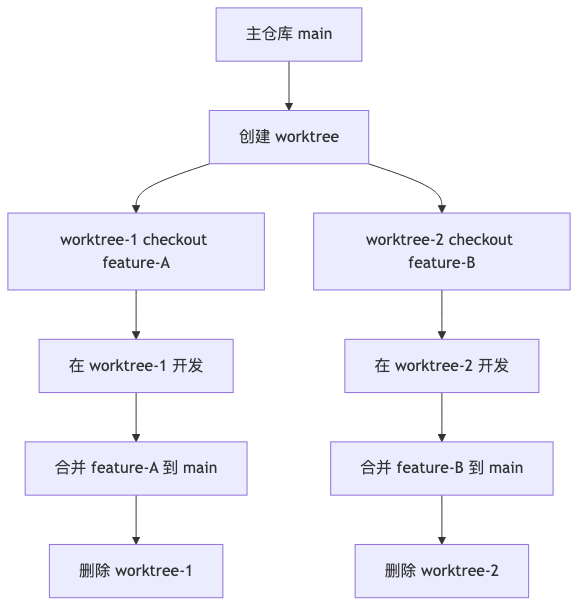
Worktree 的生命周期
完整流程:
基础命令
|
|
实用参数组合:
-b <branch>:在创建 worktree 时同时创建新分支--detach:创建游离 HEAD 状态的 worktree(适合临时实验)--lock:锁定 worktree,防止被 prune 清理
💡 Tip: 推荐实践
将 worktree 命名与分支名保持一致,例如:
1git worktree add ../project-feature-auth feature-auth
问题深度分析:为什么 Vibe Coding 需要 Worktree
AI Session 的本质需求
上下文完整性: AI session 不是原子化的命令执行,而是连续的对话流。跨越分支切换维持这种连续性的挑战,正是 GSD 如何解决上下文腐化问题。
- 用户:“帮我重构这个模块”
- AI:“我分析了依赖关系,建议分三步…”
- 用户:“第二步看起来有问题”
- AI:“你说得对,让我重新设计…”
这段对话中,AI 积累了:
- 对项目的结构理解
- 对用户偏好的认知
- 对之前尝试方案的记忆
切换分支会打断这个链条,AI 需要从零重新建立上下文。
工作环境稳定性: AI 需要稳定的文件状态来工作。如果文件被 stash 或 reset,AI 的"认知地图"就失效了:
- “我记得
auth.ts的 API 接口是…” → 文件被 stash,AI 找不到它 - “我们之前修改了…” → 修改被 reset,AI"记忆"失效
探索自由度: AI 辅助开发的核心优势是快速迭代探索。但探索需要:
- 实验性修改不影响 baseline
- 多个方案可以并行存在
- 失败的尝试可以随时丢弃
传统 Git 的单一工作目录无法满足这些需求。
传统模式的痛点
🔴 Danger: 痛点1:切换分支 = 丢失 AI 上下文
场景:你在
main分支用 AI 开发 feature-A,突然收到紧急 Bug 修复请求。传统做法:
- stash 当前修改
- checkout hotfix 分支
- 启动新的 AI session 处理 bug
- 修复完成,checkout 回 main
- stash pop 恢复修改
- 问题:原 AI session 已丢失,需要重新解释 feature-A 的设计思路
🔴 Danger: 痛点2:AI 修改文件 = stash 后 AI 找不到文件
AI 正在修改
config.ts,你突然需要切换分支。你 stash 修改,切换分支,但 AI 不知道文件被藏起来了:
- AI:“我继续修改
config.ts…”- 实际:文件已被 stash,AI 在旧版本上修改
- 结果:修改错乱,stash pop 时产生冲突
🔴 Danger: 痛点3:探索性修改 = 污染主分支或频繁 reset
AI 尝试三种架构方案:
- 方案 A:修改 10 个文件
- 发现问题,reset 回起点
- 方案 B:修改 8 个文件
- 又发现问题,reset
- 方案 C:修改 12 个文件
结果:主分支被频繁 reset,commit 历史混乱,或者不敢 commit 导致文件状态无法回溯。
🔴 Danger: 痛点4:无法并行 = 只能串行尝试不同方案
你想同时让:
- AI-1 探索前端架构方案
- AI-2 探索后端 API 方案
- AI-3 探索数据库 schema 方案
传统模式:只能串行。AI-1 探索 → reset → AI-2 探索 → reset → AI-3 探索
效率损失:3 个 AI 本可并行,却被强制串行,浪费了 AI 的快速迭代能力。
Worktree 如何对症解决
✅ Success: 每个 worktree = 独立的 AI session 家园
1 2 3 4 5 6 7 8 9# 为 feature-A 创建 worktree,启动 AI session-1 git worktree add ../project-feature-a feature-a cd ../project-feature-a # AI session-1 在这里稳定工作 # 为 hotfix 创建 worktree,启动 AI session-2 git worktree add ../project-hotfix hotfix-123 cd ../project-hotfix # AI session-2 独立工作,不影响 session-1
✅ Success: 无需切换 = 上下文永不丢失
每个 AI session 在自己的 worktree 中:
- 文件状态稳定
- 对话历史连续
- 认知环境一致
不需要 checkout,不需要 stash,不需要打断 session。
✅ Success: 多 worktree = 多 AI 并行工作
1
2
3
4
5
6
7
8
git worktree add ../exploration-a -b exploration-a git worktree add ../exploration-b -b exploration-b git worktree add ../exploration-c -b exploration-c # 在 exploration-a 启动 AI-1 探索方案 A # 在 exploration-b 启动 AI-2 探索方案 B # 在 exploration-c 启动 AI-3 探索方案 C # 三个 AI 同时工作,互不干扰
✅ Success: 实验隔离 = baseline 始终保持干净
主仓库(main 分支)始终保持干净稳定:
- 作为参考 baseline
- 作为其他 worktree 的 merge 来源
- 不被实验性修改污染
探索性 worktree 可以随意实验:
1
2
3
4
# 在 exploration worktree 中大胆尝试 # 失败了?直接删除 worktree git worktree remove ../exploration-failed # 主仓库完全不受影响
实战场景设计
场景1:多 AI 并行开发
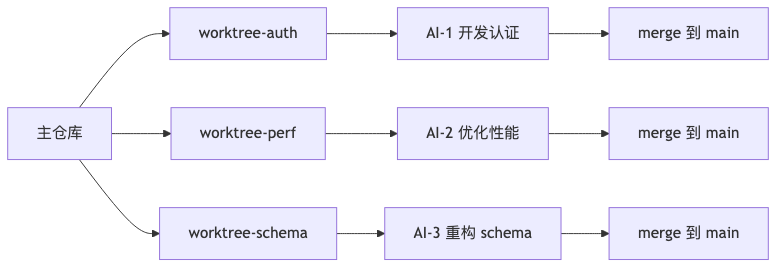
场景描述: 你需要在同一时间开发三个独立功能:
- Feature-A:用户认证模块(前端)
- Feature-B:API 性能优化(后端)
- Feature-C:数据库 schema 重构
传统困境:只能串行开发,每个功能完成后才能开始下一个。
Worktree 解决方案:
|
|
工作流程:
💡 Tip: 最佳实践
- 每个 worktree 命名清晰,与功能关联
- 每个 AI session 独立运行,不要混用
- 定期从 main pull 最新更新,保持同步
场景2:实验性功能探索
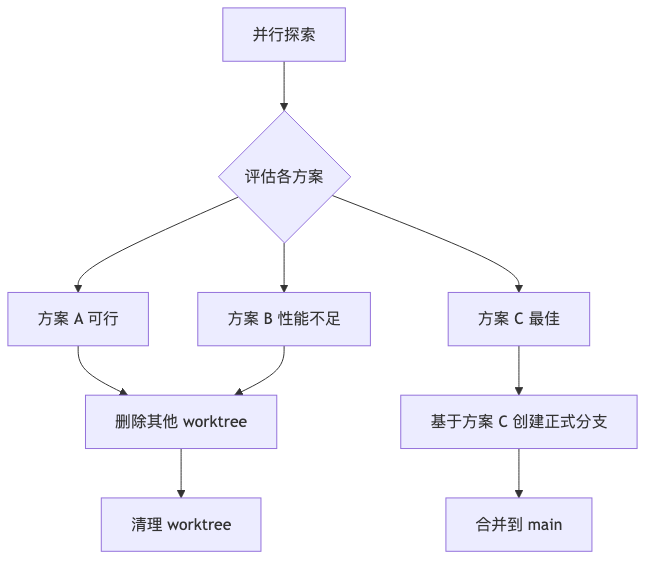
场景描述: 你不确定某架构方案是否可行,想快速尝试多个方向:
- 方案 A:使用 React Server Components
- 方案 B:采用传统 SPA 架构
- 方案 C:尝试 Next.js App Router
Worktree 解决方案:
|
|
评估决策流程:
⚠️ Warning: 注意事项
使用
--detach创建游离 HEAD 的 worktree 适合快速实验:
- 不会创建正式分支
- 可以随意修改
- 删除 worktree 后不留痕迹
定定方案后,再创建正式分支 worktree 继续开发。
场景3:紧急 Bug 修复与主开发并行
场景描述: 你正在用 AI 开发一个大型 feature(已迭代多天),突然收到紧急生产环境 Bug 报告。
传统困境:
- stash 当前 feature 的所有修改
- checkout hotfix 分支
- 新 AI session 从零开始理解 bug
- hotfix 完成后 checkout 回 feature 分支
- stash pop,冲突处理耗时
- 原 AI session 丢失,需要重新解释 feature 设计
Worktree 解决方案:
|
|
❗ Important: 关键优势
- 零打断:feature 开发的 AI session 完全不受影响
- 零冲突:两个 worktree 独立文件系统,无需 stash/pop
- 零上下文丢失:每个 AI session 在自己的环境持续工作
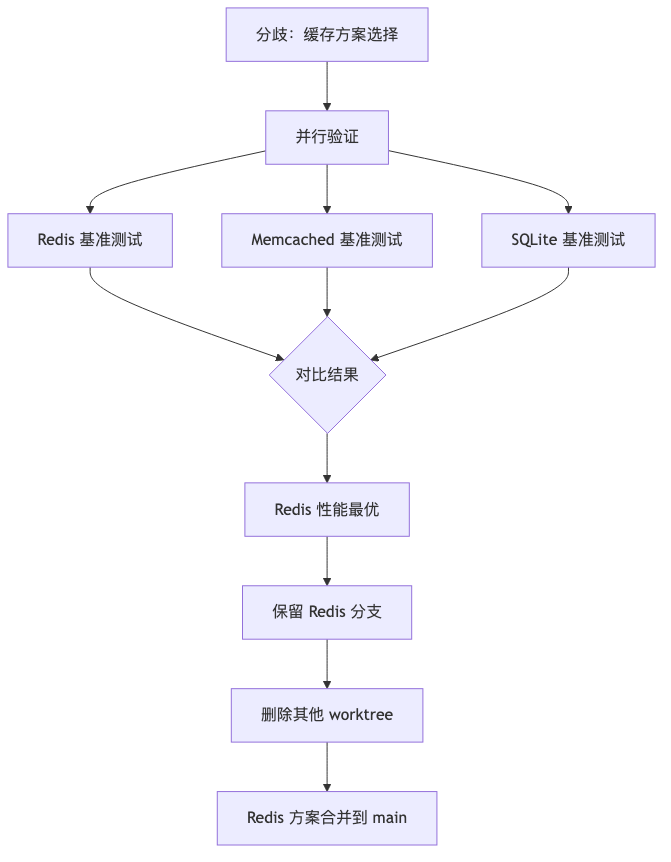
场景4:多方案对比验证
场景描述: 团队对某关键架构决策存在分歧,需要实际验证三个方案的性能表现。
Worktree 解决方案:
|
|
决策流程:
最佳实践总结
如果你对规约驱动开发感兴趣,可以看看我之前的文章 OpenSpec in OpenCode 使用心得。
Worktree 管理规范
💡 Tip: 命名约定
- 功能性 worktree:
project-{feature-name}- 探索性 worktree:
exp-{approach-name}- 修复性 worktree:
project-hotfix-{issue-number}保持命名一致性,便于管理和识别。
💡 Tip: 目录结构建议
1
2
3
4
5
6
~/projects/ ├── main-repo/ # 主仓库(保持干净) ├── project-feature-a/ # Feature-A worktree ├── project-feature-b/ # Feature-B worktree ├── exp-approach-x/ # 探索性 worktree └── project-hotfix-123/ # Hotfix worktree
AI Session 与 Worktree 绑定
❗ Important: 核心原则
一个 AI session = 一个 worktree
不要在同一个 worktree 中混用多个 AI session,也不要让一个 AI session 跨 worktree 工作。
推荐工具配置:
|
|
清理与维护
定期清理:
|
|
⚠️ Warning: 删除 worktree 前确认
- 对应分支是否已 merge 到 main
- 是否有未提交的重要修改
- 是否有依赖此 worktree 的进程(如正在运行的 AI session)
与团队协作的集成
团队最佳实践:
|
|
📝 Note: 团队沟通要点
- Worktree 是本地工具,不共享
- 通过 develop 分支同步团队进度
- 远程分支对应团队的 feature,不对应个人的 worktree
结语
对于采用 Vibe Coding 工作流的团队,拥有正确的 AI 模型选择指南 可以显著提升成果。
Vibe Coding 时代不仅仅是 AI 工具的引入,更是整个开发范式的重构。Git Worktree 不是简单的技术技巧,而是适配新开发模式的系统性解决方案。
传统 Git 工作流诞生于"单人连续工作"的时代,而 Vibe Coding 是"多 AI 并行、快速探索、上下文敏感"的新时代。Worktree 恰好弥补了传统工具与新范式之间的鸿沟。
当你开始使用 Worktree 后,你会发现:
- 上下文丢失不再是问题:每个 AI session 有自己的稳定家园
- 并行探索成为常态:多 AI 同时工作,效率倍增
- 实验不再污染主分支:大胆尝试,随时丢弃,主仓库始终保持干净
这不是 Git 的高级用法,这是 Vibe Coding 的基础设施。