A Practical Guide to Git Worktree in the Vibe Coding Era
Introduction: The Paradigm Shift in the AI Era
When we talk about “Vibe Coding,” we’re not referring to some new programming language or framework, but rather a completely new development paradigm—AI-driven interactive programming. In this era, code is no longer the product of a developer alone typing at a keyboard, but the result of continuous dialogue and collaborative exploration between humans and AI. This represents a significant Vibe Coding: Harness Engineering paradigm shift in how we approach software development.
However, this paradigm shift reveals the deep bottlenecks of traditional Git workflows:
Warning: The Limitation of a Single Working Directory Traditional Git assumes one repository has only one working directory. But in AI-assisted development, we need to simultaneously explore multiple approaches, test different implementation paths, and a single working directory simply cannot meet these needs.
The cost of branch switching manifests at multiple levels:
- The pain of stash: Before switching branches, you must stash modifications, but the AI session doesn’t know these files are hidden
- The pressure of commits: Frequently creating temporary commits pollutes the commit history
- Context loss: After switching, the context accumulated by the AI session (dialogue history, understanding of project structure) is instantly cleared
Important: The Context Fragility of AI Sessions An AI session is not a simple command executor; it carries:
- Dialogue history: The complete chain of understanding user intent
- File state cognition: The AI “knows” the structure and dependencies of current files
- Chain of thought: The reasoning process accumulated through multiple iterations
Switching branches interrupts all of this, essentially “swapping brains” for the AI.
The most critical issue is: the inability to parallelly explore multiple approaches. In traditional mode, if you want to try three different architectural approaches, you can only work sequentially: explore approach A → reset → explore approach B → reset → explore approach C. This inefficient iteration pattern contrasts sharply with AI’s rapid exploration capabilities.
Git Worktree Mechanism Analysis
What is Worktree
From a technical definition, Git Worktree is a mechanism for multiple working directories sharing a .git repository.
Note: Core Concepts
- Shared repository: All worktrees share the same
.gitdirectory, sharing the complete commit history, refs, and objects- Independent working directories: Each worktree has its own filesystem directory and can independently checkout different branches
- Branch exclusivity: A branch can only be checked out in one worktree at the same time
Difference from clone:
|
|
Relationship with branch: A branch is an abstract commit chain, while a worktree is a concrete filesystem space. A branch can exist in the history of multiple worktrees, but can only be in a “checked out” state in one worktree.
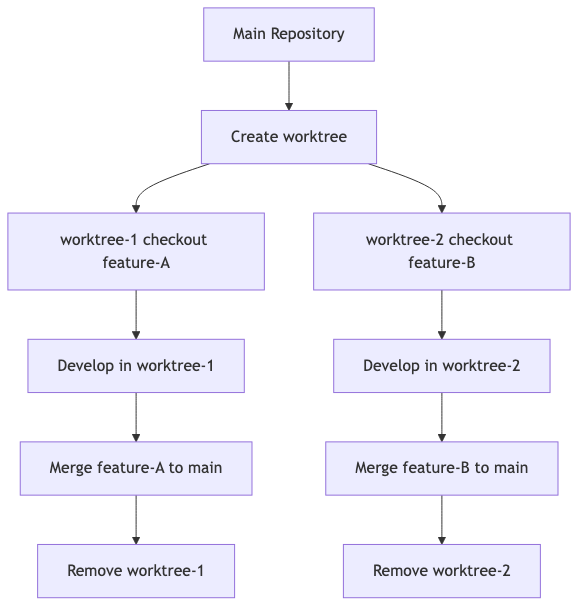
Worktree Lifecycle
Complete process:
Basic Commands
|
|
Useful parameter combinations:
-b <branch>: Create new branch when creating worktree--detach: Create detached HEAD state worktree (suitable for temporary experiments)--lock: Lock worktree to prevent being cleaned by prune
Tip: Recommended Practice Keep worktree naming consistent with branch names, for example:
1git worktree add ../project-feature-auth feature-auth
Deep Analysis: Why Vibe Coding Needs Worktree
The Essential Needs of AI Sessions
Context integrity: An AI session is not atomized command execution, but a continuous dialogue flow. The challenge of maintaining this continuity across branch switches is precisely how GSD tackles context rot.
- User: “Help me refactor this module”
- AI: “I analyzed the dependencies, suggesting a three-step approach…”
- User: “The second step seems problematic”
- AI: “You’re right, let me redesign…”
In this conversation, the AI accumulates:
- Understanding of project structure
- Cognition of user preferences
- Memory of previously attempted approaches
Switching branches breaks this chain, and the AI needs to rebuild context from scratch.
Working environment stability: AI needs stable file states to work. If files are stashed or reset, the AI’s “cognitive map” fails:
- “I remember
auth.ts’s API interface is…” → File is stashed, AI can’t find it - “We previously modified…” → Modifications are reset, AI’s “memory” fails
Exploration freedom: The core advantage of AI-assisted development is rapid iterative exploration. But exploration requires:
- Experimental modifications don’t affect baseline
- Multiple approaches can exist in parallel
- Failed attempts can be discarded anytime
Traditional Git’s single working directory cannot meet these needs.
Pain Points of Traditional Mode
Danger: Pain Point 1 - Switching Branches = Losing AI Context
Scenario: You’re using AI to develop feature-A on the
mainbranch, suddenly receiving an urgent bug fix request.Traditional approach:
- stash current modifications
- checkout hotfix branch
- Start new AI session to handle the bug
- Fix complete, checkout back to main
- stash pop to restore modifications
- Problem: Original AI session is lost, need to re-explain feature-A’s design rationale
Danger: Pain Point 2 - AI Modifying Files = AI Can’t Find Files After Stash
AI is modifying
config.ts, you suddenly need to switch branches.You stash modifications and switch branches, but the AI doesn’t know the file is hidden:
- AI: “I’ll continue modifying
config.ts…”- Reality: File has been stashed, AI is modifying the old version
- Result: Modifications become chaotic, conflicts when stash pop
Danger: Pain Point 3 - Exploratory Modifications = Polluting Main Branch or Frequent Reset
AI tries three architectural approaches:
- Approach A: Modifies 10 files
- Found problem, reset to starting point
- Approach B: Modifies 8 files
- Found another problem, reset
- Approach C: Modifies 12 files
Result: Main branch is frequently reset, commit history becomes chaotic, or developers dare not commit, making file states untraceable.
Danger: Pain Point 4 - Cannot Parallelize = Only Sequential Trials of Different Approaches
You want to simultaneously have:
- AI-1 explore frontend architecture approach
- AI-2 explore backend API approach
- AI-3 explore database schema approach
Traditional mode: Only sequential. AI-1 explores → reset → AI-2 explores → reset → AI-3 explores
Efficiency loss: 3 AIs could parallelize, but are forced to serialize, wasting AI’s rapid iteration capability.
How Worktree Solves These Problems
Success: Each worktree = Independent home for AI sessions
1 2 3 4 5 6 7 8 9# Create worktree for feature-A, start AI session-1 git worktree add ../project-feature-a feature-a cd ../project-feature-a # AI session-1 works stably here # Create worktree for hotfix, start AI session-2 git worktree add ../project-hotfix hotfix-123 cd ../project-hotfix # AI session-2 works independently, not affecting session-1
Success: No switching needed = Context never lost
Each AI session in its own worktree:
- File state is stable
- Dialogue history is continuous
- Cognitive environment is consistent
No checkout needed, no stash needed, no session interruption needed.
Success: Multiple worktrees = Multiple AI parallel work
1
2
3
4
5
6
7
8
git worktree add ../exploration-a -b exploration-a git worktree add ../exploration-b -b exploration-b git worktree add ../exploration-c -b exploration-c # In exploration-a, start AI-1 exploring approach A # In exploration-b, start AI-2 exploring approach B # In exploration-c, start AI-3 exploring approach C # Three AIs work simultaneously, no interference
Success: Experiment isolation = Baseline stays clean
Main repository (main branch) always stays clean and stable:
- As reference baseline
- As merge source for other worktrees
- Not polluted by experimental modifications
Exploratory worktrees can experiment freely:
1
2
3
4
# Boldly try in exploration worktree # Failed? Just delete the worktree git worktree remove ../exploration-failed # Main repository completely unaffected
Practical Scenario Design
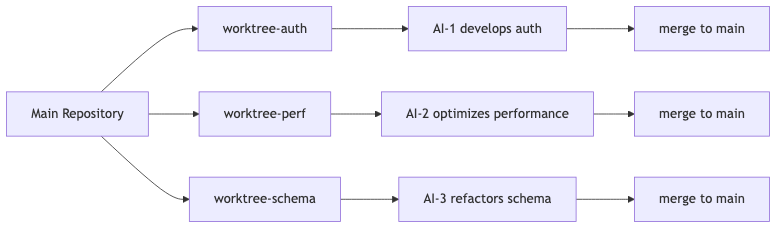
Scenario 1: Multi-AI Parallel Development
Scenario description: You need to develop three independent features at the same time:
- Feature-A: User authentication module (frontend)
- Feature-B: API performance optimization (backend)
- Feature-C: Database schema refactoring
Traditional dilemma: Only sequential development, each feature must complete before starting the next.
Worktree solution:
|
|
Workflow:
Tip: Best Practices
- Clear naming for each worktree, associated with functionality
- Each AI session runs independently, don’t mix
- Regularly pull latest updates from main, maintain synchronization
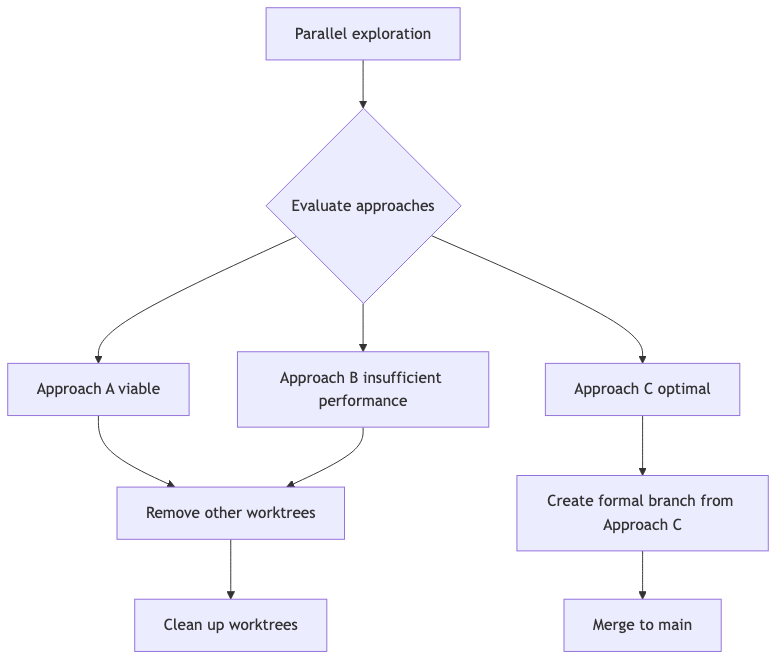
Scenario 2: Experimental Feature Exploration
Scenario description: You’re uncertain whether an architectural approach is feasible, want to quickly try multiple directions:
- Approach A: Use React Server Components
- Approach B: Adopt traditional SPA architecture
- Approach C: Try Next.js App Router
Worktree solution:
|
|
Evaluation decision process:
Warning: Important Notes Using
--detachto create detached HEAD worktrees is suitable for quick experiments:
- Won’t create formal branches
- Can freely modify
- No traces left after deleting worktree
After confirming the approach, create a formal branch worktree for continued development.
Scenario 3: Urgent Bug Fix Parallel with Main Development
Scenario description: You’re using AI to develop a large feature (iterating for days), suddenly receiving an urgent production bug report.
Traditional dilemma:
- stash all modifications for current feature
- checkout hotfix branch
- New AI session starts from zero to understand the bug
- Hotfix complete, checkout back to feature branch
- stash pop, conflict resolution takes time
- Original AI session lost, need to re-explain feature design
Worktree solution:
|
|
Important: Key Advantages
- Zero interruption: Feature development’s AI session completely unaffected
- Zero conflicts: Two worktrees have independent filesystems, no stash/pop needed
- Zero context loss: Each AI session continuously works in its own environment
Scenario 4: Multi-Approach Comparison Verification
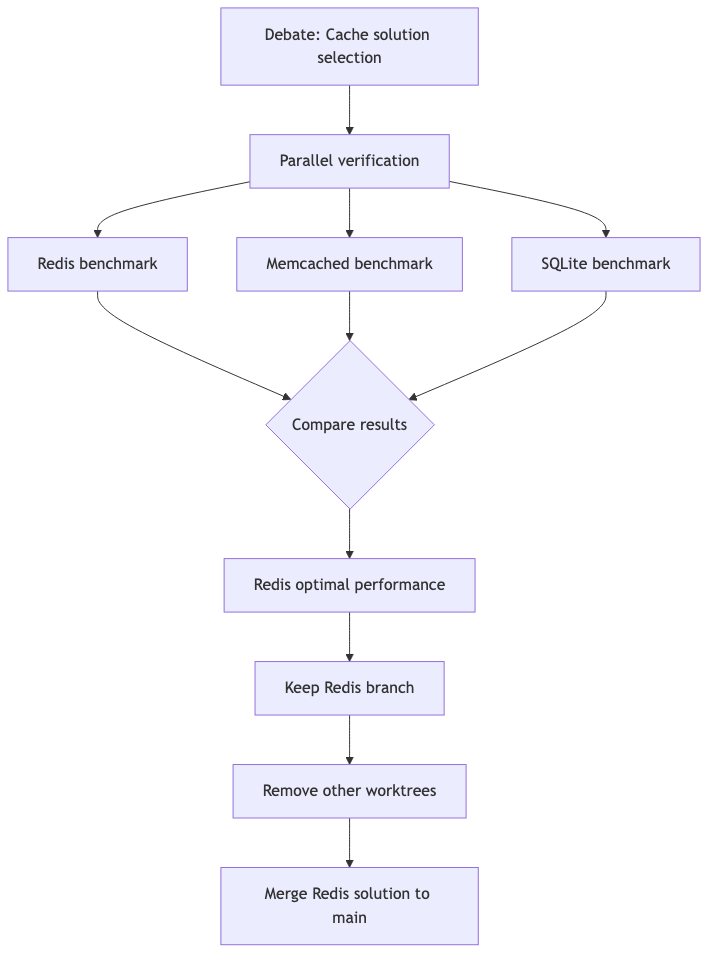
Scenario description: The team has disagreement on a key architectural decision, needs to actually verify the performance of three approaches.
Worktree solution:
|
|
Decision process:
Best Practices Summary
If you’re interested in spec-driven development, check out my previous post on OpenSpec experience in OpenCode.
Worktree Management Standards
Tip: Naming Conventions
- Functional worktree:
project-{feature-name}- Exploratory worktree:
exp-{approach-name}- Fix worktree:
project-hotfix-{issue-number}Maintain naming consistency for easy management and identification.
Tip: Directory Structure Recommendations
1
2
3
4
5
6
~/projects/ ├── main-repo/ # Main repository (keep clean) ├── project-feature-a/ # Feature-A worktree ├── project-feature-b/ # Feature-B worktree ├── exp-approach-x/ # Exploratory worktree └── project-hotfix-123/ # Hotfix worktree
AI Session and Worktree Binding
Important: Core Principle One AI session = One worktree
Don’t mix multiple AI sessions in the same worktree, and don’t let one AI session work across worktrees.
Recommended tool configuration:
|
|
Cleanup and Maintenance
Regular cleanup:
|
|
Warning: Confirm Before Deleting Worktree
- Whether corresponding branch has been merged to main
- Whether there are uncommitted important modifications
- Whether there are processes depending on this worktree (like running AI sessions)
Integration with Team Collaboration
Team best practices:
|
|
Note: Team Communication Points
- Worktree is a local tool, not shared
- Synchronize team progress through develop branch
- Remote branches correspond to team features, not individual worktrees
Conclusion
For teams adopting Vibe Coding workflows, having the right AI model selection guide can significantly improve outcomes.
The Vibe Coding era is not just about introducing AI tools, but about reconstructing the entire development paradigm. Git Worktree is not a simple technical trick, but a systematic solution adapted to the new development mode.
Traditional Git workflows were born in the era of “single-person continuous work,” while Vibe Coding is a new era of “multi-AI parallel, rapid exploration, context-sensitive.” Worktree precisely fills the gap between traditional tools and new paradigms.
After you start using Worktree, you’ll discover:
- Context loss is no longer a problem: Each AI session has its own stable home
- Parallel exploration becomes normal: Multiple AIs work simultaneously, efficiency multiplied
- Experiments no longer pollute main branch: Boldly try, discard anytime, main repository always stays clean
This is not Git’s advanced usage—this is Vibe Coding’s infrastructure.