
Introduction: Getting Started with OpenSpec in OpenCode

Recently, I’ve been experimenting with OpenSpec in the OpenCode environment, and I wanted to share my experience. For those unfamiliar, OpenSpec is a spec-driven development (SDD) framework that brings structure to AI-assisted coding workflows. What caught my attention is that it now supports integration with OpenCode, making it a perfect match for my development setup.
In this post, I’ll walk through what I’ve learned about spec-driven development, how it complements vibe coding, and why I ultimately chose OpenSpec over alternatives like GitHub’s Spec Kit.
What is Spec-Driven Development?

Spec-Driven Development (SDD) is an approach where you define clear specifications before writing any code. Instead of jumping straight into implementation, you first articulate what you want to build, why you’re building it, and how it should work. Think of it as writing a detailed blueprint before constructing a house.
The Core Workflow
OpenSpec follows a straightforward three-phase process:
- Propose — Describe your idea, and the AI generates a proposal, specifications, design document, and task breakdown
- Apply — The AI implements the changes step by step, following the task checklist
- Archive — Completed changes are moved to an archive with a clear record of what was done
Key Advantages
- Alignment before implementation: Both you and the AI agree on the approach before any code is written
- Persistent context: Spec files live in your codebase (under
openspec/), so context doesn’t disappear between chat sessions - Trackable progress: Tasks are organized as checklists that can be monitored and reviewed
- Audit trail: Every change has a documented history, making it easier to understand past decisions
Combining with Vibe Coding
If you’re into vibe coding (that intuitive, flow-state style of development where you iterate quickly based on feel), you might wonder if SDD feels too rigid. In my experience, they actually complement each other beautifully. Vibe coding is great for exploration and rapid prototyping, while SDD shines when you need to implement complex features or maintain long-term projects. Use vibe coding to explore ideas, then switch to SDD when you’re ready to build something that needs to last.
Switching Models in oh-my-opencode
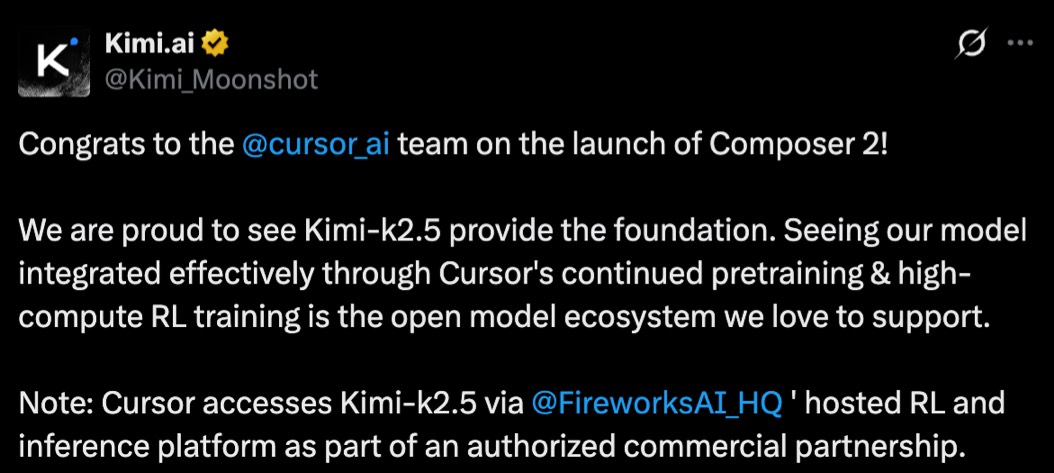
A quick detour: if you’ve been following my previous posts, you know I’ve been optimizing my oh-my-opencode model configuration. Recently, I made another change — I’ve switched my primary model to Kimi K2.5.
Interestingly, this coincides with some industry news: Cursor recently announced that their new Composer 2 model was built on top of Kimi K2.5 as the training base. While Cursor added their own continued pretraining and reinforcement learning on top, the foundation is Kimi K2.5. This validates my decision — if Cursor is betting on Kimi for their coding assistant, it’s probably worth considering for my setup too.
OpenSpec vs. Spec Kit: A Comparison
Before settling on OpenSpec, I evaluated GitHub’s Spec Kit as well. Here’s how they compare:
| Aspect | OpenSpec | Spec Kit |
|---|---|---|
| Approach | Iterative, proposal-first | Thorough but heavyweight |
| Best For | Brownfield projects, existing codebases | Greenfield projects, new features |
| Workflow | Fluid phases (propose → apply → archive) | Rigid phase gates |
| Setup | Lightweight (npm install) | Requires Python setup |
| Documentation | Markdown-based, minimal | Extensive Markdown templates |
| Delta Tracking | Built-in (ADDED/MODIFIED/REMOVED) | Manual reconciliation |
| Tool Support | 20+ agents/IDEs | 8+ supported agents |
Key Differences
Spec Kit is excellent for large greenfield features where upfront planning pays off. It provides comprehensive templates and strict phase gates that ensure thoroughness. However, this rigidity can feel like overkill for smaller tasks or when working with existing codebases.
OpenSpec, on the other hand, is designed with brownfield projects in mind. It uses delta markers to track changes relative to existing functionality, making it ideal for iterative improvements. The workflow is more fluid — you can update any artifact at any time without rigid phase gates.
Why I Chose OpenSpec
After experimenting with both, I settled on OpenSpec for several reasons:
1. Maintaining Legacy Projects
Most of my work involves maintaining existing projects rather than building from scratch. OpenSpec’s delta-tracking approach (marking changes as ADDED, MODIFIED, or REMOVED) fits this workflow perfectly.
2. Team Collaboration Considerations
In a team environment, not everyone may adopt OpenSpec. OpenSpec’s flexibility means team members can still understand and review the changes even if they’re not using the tool themselves — the specs are just Markdown files in the repo.
3. Simplicity
OpenSpec feels lighter and more approachable for day-to-day development. I don’t need to set up Python environments or navigate complex templates. A simple npm install -g @fission-ai/openspec and I’m ready to go.
4. Personal Development Workflow
For my personal projects and smaller tasks, OpenSpec strikes the right balance. It provides enough structure to keep me organized without feeling bureaucratic.
How to Use OpenSpec: Tips and Tricks
Getting Started
|
|
This creates an openspec/ directory with:
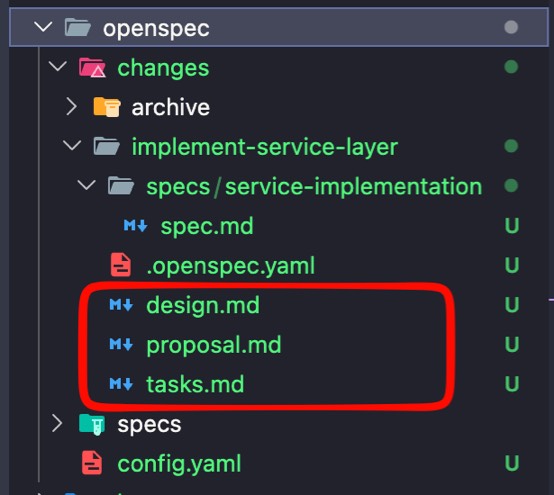
AGENTS.md— Instructions for AI agentsproject.md— Global project contextspecs/— Current system specificationschanges/— Active change proposals
Basic Workflow
-
Create a proposal:
1/opsx:propose add-user-authenticationThe AI generates:
proposal.md,design.md,tasks.md, and delta specs -
Review and refine: Check the generated files and adjust as needed
-
Apply the changes:
1/opsx:applyThe AI follows the task checklist and implements each item
-
Archive when done:
1/opsx:archiveCompleted changes move to
openspec/changes/archive/
Pro Tips
- Start small: Don’t try to spec out your entire project at once. Begin with one feature or bug fix
- Review before applying: The proposal phase is your chance to catch misunderstandings before code is written
- Keep specs in version control: Commit your
openspec/directory so the whole team benefits - Use
/opsx:onboardfor existing projects: This command scans your codebase and generates initial specs
Conclusion
After several weeks of using OpenSpec in OpenCode, I’m convinced that spec-driven development has a place in modern AI-assisted workflows. It doesn’t replace the creative, exploratory nature of vibe coding, but it adds a valuable layer of structure when you need it.
The combination of OpenSpec’s lightweight approach and OpenCode’s agent architecture feels like a natural fit. Whether you’re maintaining legacy code, collaborating with a team, or just want to be more intentional about your development process, I’d recommend giving it a try.
If you’re already using oh-my-opencode, the integration is seamless — just initialize OpenSpec in your project and start using the slash commands. And if you’re curious about my model configuration journey, check out my previous post on oh-my-opencode model selection for the full breakdown.
Have you tried spec-driven development with OpenSpec or Spec Kit? I’d love to hear about your experience in the comments.